


Acasă > Health & Wellbeing > Physical Health > Thermal Imaging Cameras
Thermal Imaging Cameras
Suffolk Community Libraries has partnered with Sustainable Suffolk to make thermal imaging cameras available for people to borrow from our libraries.
Many of us live in homes that are not very energy-efficient and leak heat. During the winter months, this means many of us feel the chill inside, and despite our best efforts, struggle to keep our homes warm.
Thermal cameras help you identify where your home is losing heat, pinpointing drafts that could be sealed or areas that could benefit from extra insulation. Home improvements big or small can make a noticeable difference, helping you keep your home cosy and comfortable over the winter months whilst reducing your energy bills.
The cameras can be borrowed from any of our 45 libraries and our mobile libraries. They can be borrowed for one week. There is no charge for loaning the cameras, but they will incur late fees at the same rate as adult books and a replacement fee if lost or broken.
How to borrow a thermal imaging camera
Thermal imaging cameras can be borrowed from Biblioteca Județeană Ipswich or reserved from our online catalogue to be collected from your local library.
You will need a library card to borrow a camera – if you don’t have a library card, you can sign up online or at your local library.
Important information
- You must be at least 18 years old to borrow a camera
- You must have a Suffolk Community Libraries card in good standing with no outstanding fines or history of multiple lost items
- Loan periods are for one week, with the option to renew if there are no outstanding reservations
- If you lose the camera, a replacement fee will be added to your account
- You will be asked to sign a user agreement before you are able to take the camera out on loan.
How to use thermal imaging cameras
All cameras will come with an instruction booklet which will inform you on how to use the cameras and interpret the images captured.
To use the camera, you will need a smartphone or tablet as this is what you connect to the thermal imaging camera. Your device will need at least iOS 17 or Android 13 so that you can install the FLIR ONE app.
Download the FLIR ONE app from the Apple iOS store for iPhones or from the Google Play store for Android phones.
- No phone signal is required when using the camera
- Photos taken are stored on your device not the camera so only you can see them
- For the best images, make sure inside your home is 8-10°C warmer than outside
- If using the thermal imaging camera inside, take photos when rooms are at usual temperature, the heating is off and avoid recently used bathrooms. Cooler coloured areas (bluer) highlight where heat is leaving and could benefit from insulation
- If being used outside, avoid taking photos during the day or directly after heavy rain. Warm colours (red) highlight where heat is leaving the building.
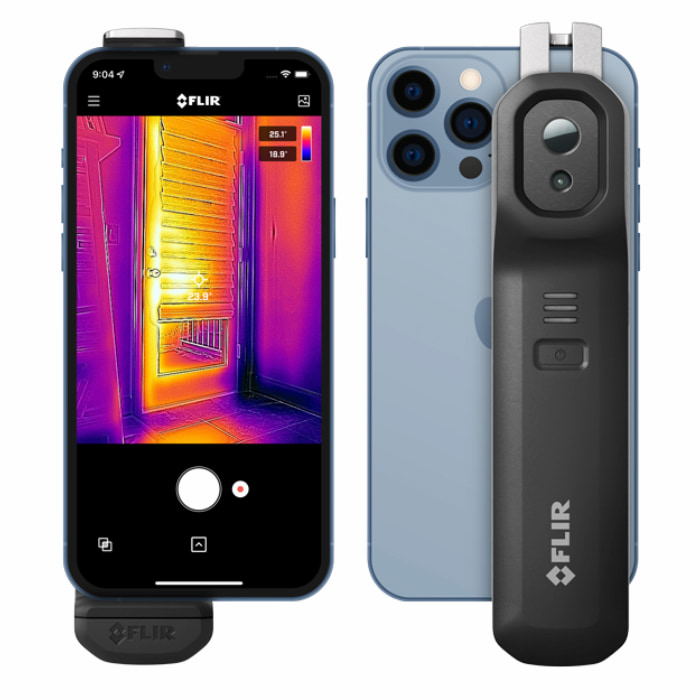
For full instructions on how to use the camera and more useful information view the Thermal Camera Loan Guidance (PDF).
For information about offers, schemes, support and grants available for Suffolk residents to help make their homes warmer and more energy efficient visit the Sustainable Suffolk website.

 Romanian
  English
  Polish
  Lithuanian
  Portuguese
  Bengali